Your keywords, rankings, and competing apps together
ASO Engine’s app ranking tracker pairs each term with a storefront and your app’s observed search position. Keep your shortlist in the Keywords workspace, compare estimated popularity and difficulty, and open the ranking apps when you want more context.
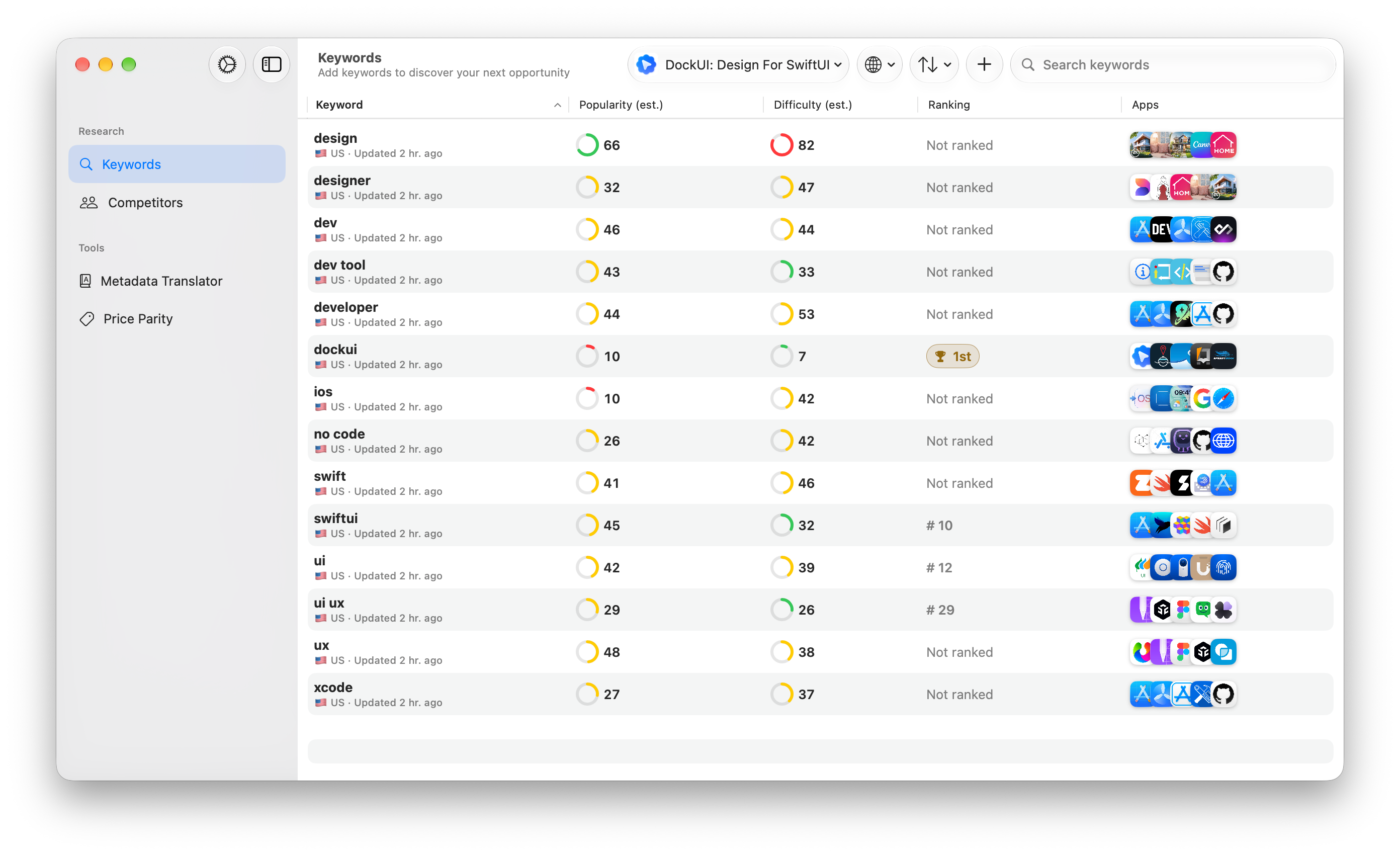
How to check your App Store keyword ranking
Add your app
Add the app you want to research by searching the App Store, then open the Keywords workspace.
Choose keywords and a country
Add the phrases you want to check and choose a storefront. Each keyword and country is a separate search.
Read the observed position
Wait for research to complete, then check the Ranking column. Open View apps to inspect the search results and see the apps appearing around yours.
Compare saved observations
Open a ranking badge or Ranking history to review available observations. Revisit the same keyword and country after a listing update.
A real App Store keyword ranking example
I use ASO Engine to research my own app, DockUI: Design For SwiftUI. In a US storefront snapshot viewed on November 5, 2026, the Keywords workspace showed these positions:
That gives me a useful starting point: monitor swiftui, where DockUI appeared in the top 10, and investigate whether ui is a relevant opportunity worth improving. A lower position alone doesn’t tell me how many people search for a term or whether a metadata change will move it.
These are observed positions from one saved US snapshot, not current or guaranteed rankings. Results can vary over time and by storefront. App-wide search impressions and downloads can’t be attributed to these individual keywords from this snapshot.
After a listing change, compare the same terms and storefront again. For broader outcomes, check App Store Search impressions and downloads in your own App Store Connect Analytics; Apple explains how to monitor search performance.
How to check keyword rankings by country → · Compare ASO Engine and Astro →
Compare keyword rankings across App Store countries
The country is part of the measurement. A term can bring up different apps in the United States, Germany, or Japan, even when you type the same words. Track each storefront separately rather than treating one country’s result as your worldwide rank.
The app’s country picker includes the United States, United Kingdom, Canada, Australia, Germany, France, Spain, Brazil, India, Japan, South Korea, Russia, and other supported storefronts. Use the country menu to focus your table or view All Countries. Availability and freshness can vary by storefront.
For example, you could track “focus timer” in the US and Germany as two keyword rows. If one moves and the other does not, inspect their different search results before changing both listings. This is an example workflow, not measured performance data.
Use ranking history to review a listing change
A one-off app rank check tells you an observed position. Saved observations help you ask whether that position is changing. Record your baseline before an app name, subtitle, or keyword update, then compare the same term and country afterward.
A change from #24 to #12 would be worth investigating, but it would not prove that your edit caused it. Check whether the movement persists and whether your own App Store Connect search-source metrics change. Competitor updates and other market changes can affect the results too.
History is based on available checks, not a continuous feed of every App Store search. A missing observation is not a rank of zero. Read how to interpret ranking changes →
Know what an app rank checker can—and cannot—tell you
Keyword position
Where your app appeared in the checked results for a specific search and storefront. It is not a universal ranking on every user’s device.
Research estimates
Popularity and difficulty help organize candidates. They are not official Apple search counts or verified competitor sales.
Not ranked
The app was not found in the checked result set. This does not establish an exact lower position or mean the app is unavailable.
Start with terms that accurately describe your product. Use App Store keyword research to build the shortlist and competitor analysis to inspect the apps already appearing. Read the data limitations before using estimates to make business decisions.
App Store rank-tracking questions
Is this App Store rank tracker free?
The current ASO Engine release is free to download and use. No ASO Engine account or App Store Connect API key is required for public keyword and ranking research. Optional AI metadata translation uses your own OpenAI key and has separate API costs.
Can I check an app’s ranking in my browser?
ASO Engine is a downloadable Mac app, not an online rank-check form. Install it on a Mac running macOS 15 or later. The direct download supports Apple Silicon and Intel Macs.
How many keywords can I track?
Each tracked keyword and storefront combination uses a separate row. Your app shows its current keyword limit when you add keywords.
Does it track Google Play or App Store top charts?
This workflow tracks keyword search positions from the Apple App Store. It is not a Google Play rank tracker, and a keyword position is not a category top-chart position or an app’s overall popularity rank.
Why is my keyword pending or not ranked?
Pending means research has not completed; it is not a ranking of zero. Not ranked means the app was not found in the checked results. Cached data, service limits, and upstream availability can affect checks. If a retry time appears, wait before retrying.
Are popularity and difficulty official Apple numbers?
No. ASO Engine’s popularity and difficulty scores are research estimates, not Apple Search Ads search-volume data. Ranking is a separate observed search position. Neither the scores nor a position guarantee downloads.
Having trouble loading a result? Check the pending-results troubleshooting guide →
Start with one app, one country, and a useful shortlist
You do not need a developer-account connection to research public App Store results. Download ASO Engine, add your tracked app, and choose a few relevant terms you will actually revisit.
Need help choosing your first keywords? Read the research guide →